---
title: How to use MQTT service with Alleantia?
description: Do you want publish and subscribe data collected by devices on your MQTT broker?
---
[Skip to content](https://kb.alleantia.com/how-can-i-use-the-mqtt-service-with-alleantia#main-content)
English
Show submenu for translations
![Alleantia\_ATJ\_whitelogocolorbandtrasnpbg\_HR-Oct-21-2021-02-02-26-19-PM.png\]](https://kb.alleantia.com/hs-fs/hubfs/Alleantia_ATJ_whitelogocolorbandtrasnpbg_HR-Oct-21-2021-02-02-26-19-PM.png?height=40&name=Alleantia_ATJ_whitelogocolorbandtrasnpbg_HR-Oct-21-2021-02-02-26-19-PM.png)
Open main navigation
Close main navigation
- English
Show submenu for translations
- [Visit our site](https://www.alleantia.com/)
[Visit our site](https://www.alleantia.com/)
Welcome to Alleantia, Industrial IoT Edge Gateway. How can we help you?
- There are no suggestions because the search field is empty.
1. [Alleantia Knowledge Base](https://kb.alleantia.com/)
2. [Stream Data - IIoT Apps](https://kb.alleantia.com/stream-data-iiot-apps)
3. [MQTT](https://kb.alleantia.com/stream-data-iiot-apps#mqtt)
# How to use MQTT service with Alleantia?
## Do you want publish and subscribe data collected by devices on your MQTT broker?
The **MQTT service** allows you to see all the insights of the machines connected in real-time: from the data to the samples to the telemetry, analysis, and bizarre messages, the maximum advantage from them, and to pass them also to the management software.
Follow these simple instructions now to use the **MQTT service**:
1\. Open the **Alleantia Core** Application
2\. Go to the **Configuration** tab and enter your credentials
3\. Go to **Communication**
4\. Click on the **MQTT Broker Configuration** button
5\. Add the parameters of your **MQTT broker** (broker name, IP Address, port, and the credential if the broker requires authentication)
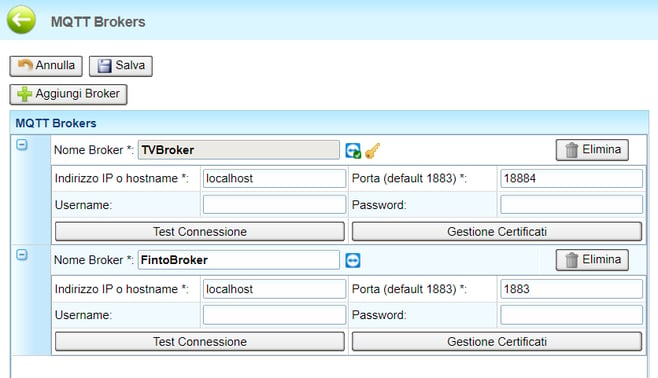
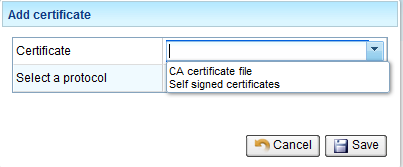
- Clicking on **Manage Certificate** you can add the certificate required for connection
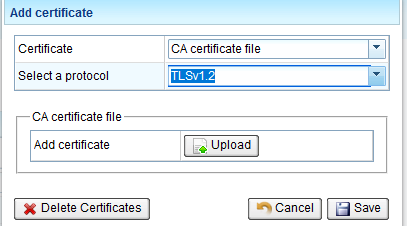
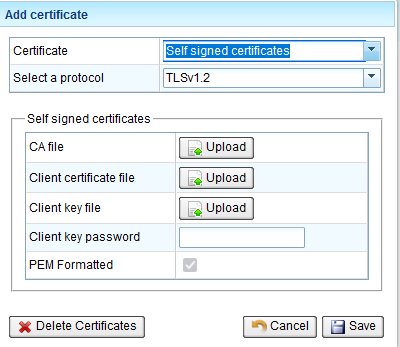
- Alleantia accepts both Self signed certificates and CA Certificate file
- In **Select a protocol** you can choose SSL version from 1 to 3 and TLS version from 1.1 to 1.3
6\. Go back to the **Configuration** tab
7\. In the "Cloud Services" section, press the **MQTT Service** button
8\. Choose the broker you have just selected from the drop-down menu
9\. Choose the variables you want to use and enter the parameters that are congenial to you
10\. Enable publication on the broker and save the configuration
11\. When the small computer icon turns green, the data will begin to be sent to the broker
If you need more info you can check the manual:
**[Alleantia MQTT\_User Guide \[ITA\]](https://kb.alleantia.com/hubfs/Manuale_Uso_MQTT%20ITA%205_1_2.pdf)**
**[Alleantia MQTT\_User Guide \[ENG\]](https://kb.alleantia.com/hubfs/Manuale_Uso_MQTT%20ENG%205_1_2.pdf)**
---
### **If you need support don't hesistate to contact us**
- [Industrial IoT Connectivity in 4 steps](https://kb.alleantia.com/industrial-iot-connectivity-in-4-steps#main-content)
- [Industrial Connectivity in 5 minutes - Configuration Steps](https://kb.alleantia.com/industrial-iot-connectivity-in-4-steps#industrial-connectivity-in-5-minutes-configuration-steps)
- [Alleantia Platform Overview](https://kb.alleantia.com/alleantia-platform-overview#main-content)
- [Alleantia Core](https://kb.alleantia.com/alleantia-platform-overview#alleantia-core)
- [Cloud Portal](https://kb.alleantia.com/alleantia-platform-overview#cloud-portal)
- [Machine Drivers](https://kb.alleantia.com/alleantia-platform-overview#machine-drivers)
- [IIoT Apps - Connect Business Apps](https://kb.alleantia.com/alleantia-platform-overview#iiot-apps-connect-business-apps)
- [Site Manager](https://kb.alleantia.com/alleantia-platform-overview#site-manager)
- [Alleantia Core](https://kb.alleantia.com/alleantia-core#main-content)
- [Alleantia Core - Download and Configurations](https://kb.alleantia.com/alleantia-core#alleantia-core-download-and-configurations)
- [Licenses and Free Version](https://kb.alleantia.com/licenses-and-free-version#main-content)
- [License Management](https://kb.alleantia.com/licenses-and-free-version#license-management)
- [Alleantia Core - Free Version](https://kb.alleantia.com/licenses-and-free-version#alleantia-core-free-version)
- [Machine Drivers](https://kb.alleantia.com/machine-drivers#main-content)
- [How can I create a driver with spreadsheet template??](https://kb.alleantia.com/machine-drivers#how-can-i-create-a-driver-with-spreadsheet-template)
- [How can I create a driver with Driver Editor?](https://kb.alleantia.com/machine-drivers#how-can-i-create-a-driver-with-driver-editor)
- [Private Library](https://kb.alleantia.com/machine-drivers#private-library)
- [Machines connection configurations](https://kb.alleantia.com/machine-drivers#machines-connection-configurations)
- [Stream Data - IIoT Apps](https://kb.alleantia.com/stream-data-iiot-apps#main-content)
- [API REST](https://kb.alleantia.com/stream-data-iiot-apps#api-rest)
- [Modbus](https://kb.alleantia.com/stream-data-iiot-apps#modbus)
- [OPC UA](https://kb.alleantia.com/stream-data-iiot-apps#opc-ua)
- [AWS](https://kb.alleantia.com/stream-data-iiot-apps#aws)
- [Boomi](https://kb.alleantia.com/stream-data-iiot-apps#boomi)
- [Microsoft Azure](https://kb.alleantia.com/stream-data-iiot-apps#microsoft-azure)
- [Dropbox](https://kb.alleantia.com/stream-data-iiot-apps#dropbox)
- [MQTT](https://kb.alleantia.com/stream-data-iiot-apps#mqtt)
- [SQL](https://kb.alleantia.com/stream-data-iiot-apps#sql)
- [OneDrive for Business](https://kb.alleantia.com/stream-data-iiot-apps#onedrive-for-business)
- [TeamViewer](https://kb.alleantia.com/stream-data-iiot-apps#teamviewer)
- [Alleantia Certified Hardware](https://kb.alleantia.com/alleantia-certified-hardware#main-content)
- [Advantech](https://kb.alleantia.com/alleantia-certified-hardware#advantech)
- [Cisco](https://kb.alleantia.com/alleantia-certified-hardware#cisco)
- [Dell](https://kb.alleantia.com/alleantia-certified-hardware#dell)
- [Eurotech](https://kb.alleantia.com/alleantia-certified-hardware#eurotech)
- [Lenovo](https://kb.alleantia.com/alleantia-certified-hardware#lenovo)
- [Portwell](https://kb.alleantia.com/alleantia-certified-hardware#portwell)
- [Stratus](https://kb.alleantia.com/alleantia-certified-hardware#stratus)
- [Simulators and Starter Kit Industria 4.0](https://kb.alleantia.com/simulators-and-starter-kit-industria-4-0#main-content)
- [Simulators - PLCs, CNC, Energy meters](https://kb.alleantia.com/simulators-and-starter-kit-industria-4-0#simulators-plcs-cnc-energy-meters)
- [Starter Kit Industria 4.0](https://kb.alleantia.com/simulators-and-starter-kit-industria-4-0#starter-kit-industria-4-0)
- [Edge Operational Applications](https://kb.alleantia.com/edge-operational-applications#main-content)
- [Cobot Smart Service](https://kb.alleantia.com/edge-operational-applications#cobot-smart-service)
- [FAQs - Trouble Shooting](https://kb.alleantia.com/faqs-trouble-shooting#main-content)
- [Configurations](https://kb.alleantia.com/faqs-trouble-shooting#configurations)
- [System Setup](https://kb.alleantia.com/faqs-trouble-shooting#system-setup)
- [Interfaces to IIoT Apps](https://kb.alleantia.com/faqs-trouble-shooting#interfaces-to-iiot-apps)
- [Interfaces to Industrial Devices](https://kb.alleantia.com/faqs-trouble-shooting#interfaces-to-industrial-devices)
- [Connectivity](https://kb.alleantia.com/connectivity)
[](http://www.alleantia.com)
© 2024 Alleantia s.r.l
Copyright © 2026, ALLEANTIA SRL
```json
{
"@context" : "https://schema.org",
"@type" : "VideoObject",
"caption" : {
"@type" : "MediaObject",
"contentUrl" : "https://kb.alleantia.com/media-transcripts/29429065971/en.vtt",
"inLanguage" : "en",
"name" : "en Captions"
},
"contentUrl" : "https://6293978.fs1.hubspotusercontent-eu1.net/hubfs/6293978/Servizio%20MQTT.mp4",
"dateModified" : "2025-09-29T12:11:31.182Z",
"duration" : "PT3M3S",
"height" : 1040,
"name" : "MQTT SERVICE ",
"thumbnailUrl" : "https://6293978.fs1.hubspotusercontent-eu1.net/hubfs/6293978/Servizio%20MQTT.mp4/medium.jpg",
"uploadDate" : "2020-05-15T15:42:49.425Z",
"width" : 1918
}
```